Google has officially integrated Gemini AI into Gmail to streamline meeting coordination, allowing users to suggest optimal time slots directly within the email compose window. Announced this Tuesday, the new “Help me schedule” feature analyzes your Google Calendar availability to propose meeting times tailored to the context of your ongoing conversation.
Currently, the functionality is strictly optimized for one-on-one interactions, meaning it does not support group meetings or scheduling with multiple contacts at this time.
Expanding the AI-Powered Workspace
This rollout is part of a broader push to embed generative AI across the Google Workspace ecosystem. Recent announcements from the company include the debut of the Nano Banana image editing model, new Gemini-powered features for Google Slides, the ability to share custom AI assistants known as Gems, updated formats for NotebookLM, and enhanced AI video capabilities within Google Vids.
How the “Help Me Schedule” Feature Works
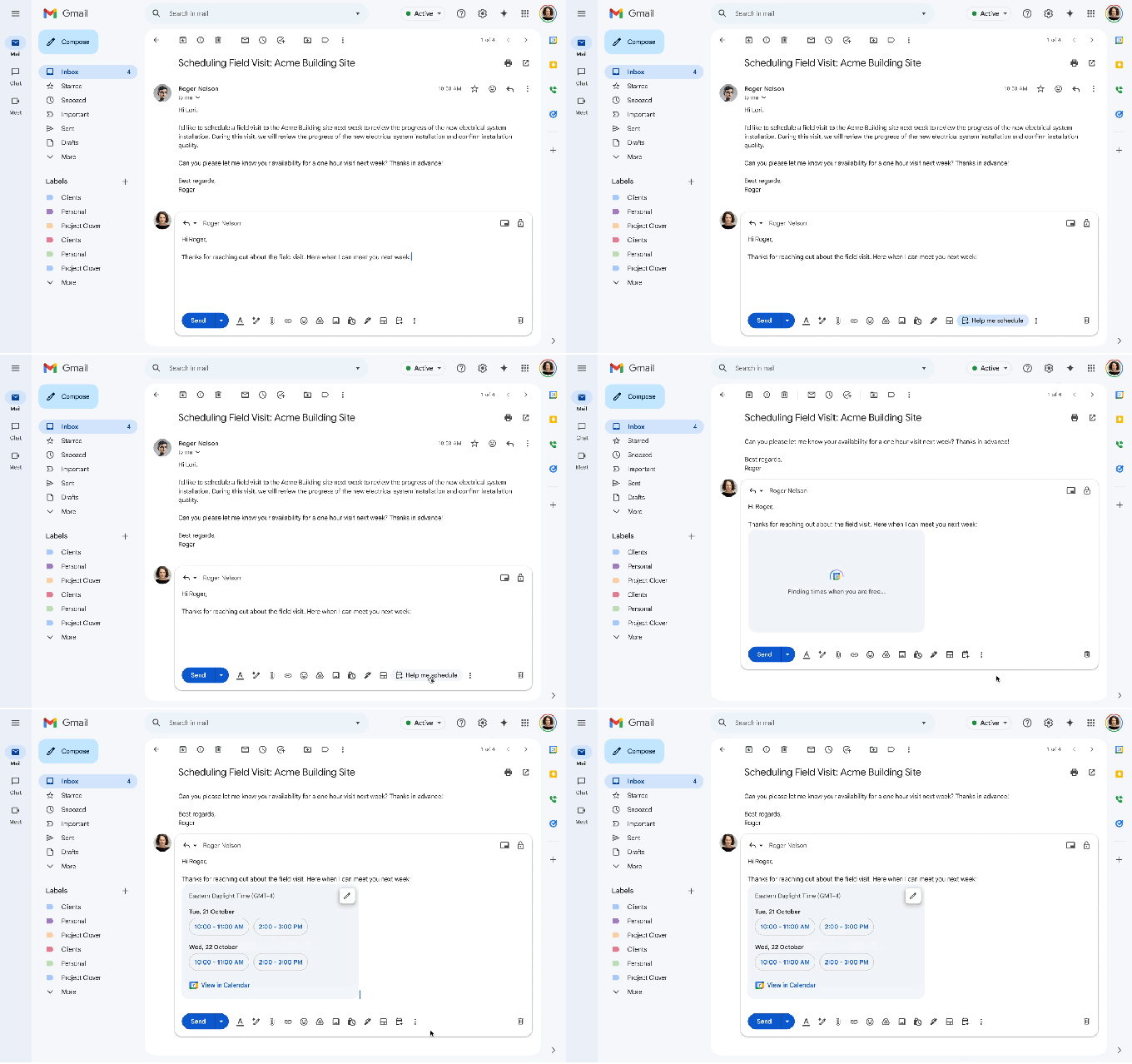
To utilize the tool, users can select the “Help me schedule” button located beneath the email compose screen. Gemini then generates a list of available time slots from your calendar. Users maintain full control, with the ability to edit or remove specific options before embedding them directly into the email draft. Once the recipient selects a preferred time, the meeting is automatically populated on both parties’ calendars.
Context-Aware Scheduling vs. Traditional Tools
While the scheduling market is already crowded with competitors such as Calendly, Doodle, Zoom, and HubSpot, Google differentiates its offering through AI-driven context awareness. Unlike static scheduling links, Gemini reads the email content to refine its suggestions. For example, if an email mentions a request for a 30-minute meeting by the end of next week, the assistant filters results to show only 30-minute windows that align with those specific parameters.
This marks a significant evolution from Google’s previous appointment scheduling feature, which lacked both AI intelligence and direct integration within the Gmail interface.
Additional Workspace Updates
Beyond meeting logistics, Google also announced that Google Keep reminders are now automatically synced and saved to Google Tasks, further consolidating workflow management across its suite of applications.